
TL;DR:
Enable the “Anywhere” option in Gatekeeper settings via System Preferences > Security & Privacy > General to run the Time Doctor installer on OS X 10.8.
macOS 10.8 Mountain Lion introduced Gatekeeper, a security feature that controls which applications can be installed on the system. Applications downloaded from sources other than the App Store typically trigger a warning message.
The warning message appears like this:
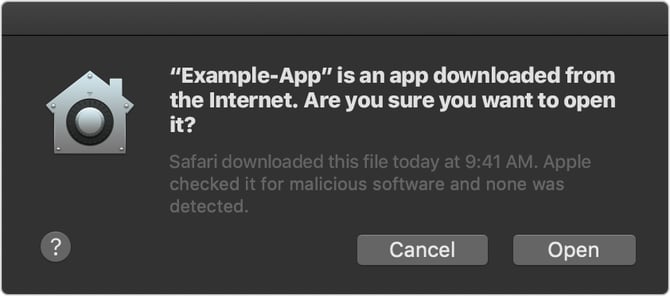
To bypass this warning and install the Time Doctor app, follow these steps:
Steps to Allow App Installation
-
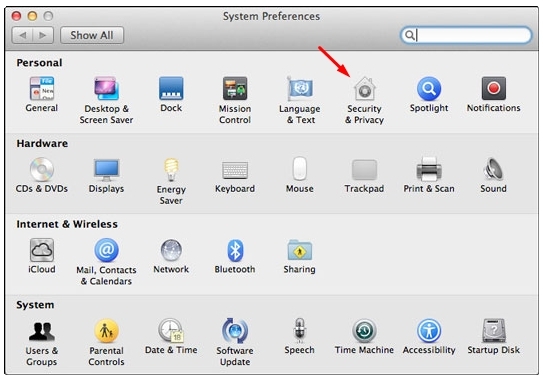
Click the Apple icon and select System Preferences.
-
Click Security & Privacy.
-
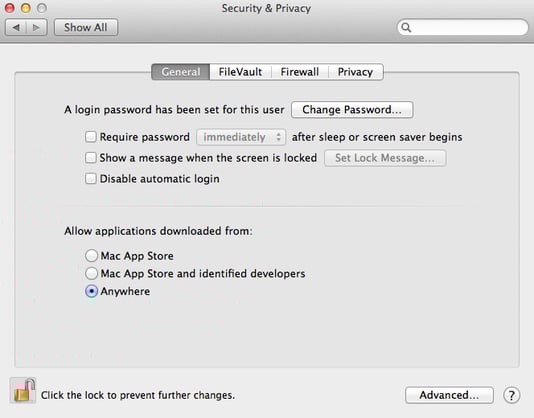
Under the General tab, click the lock icon in the bottom left and enter the system password to unlock the settings.
-
In the Allow applications downloaded from section, select Anywhere.
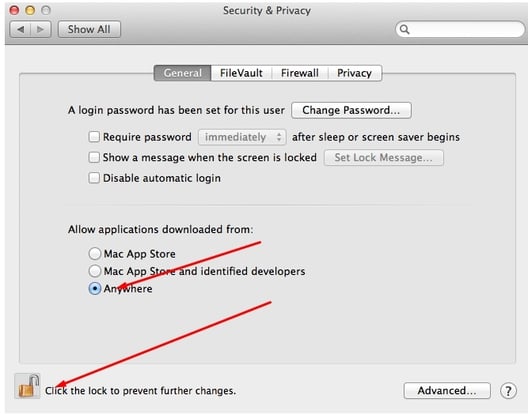
The Time Doctor installer can now be run without any security warnings.
For more details, refer to the Apple Knowledge Base on Gatekeeper.
Should there be any inconsistencies or concerns regarding the article, contact support@timedoctor.com for prompt assistance.