
TL;DR:
Yes, users can be in different time zones, but all tracked time is recorded in the company’s time zone. Configure individual or company time zones via the User Settings or Company Settings pages.
Managing User and Company Time Zones
Note: All tracked time is recorded based on the company’s time zone.
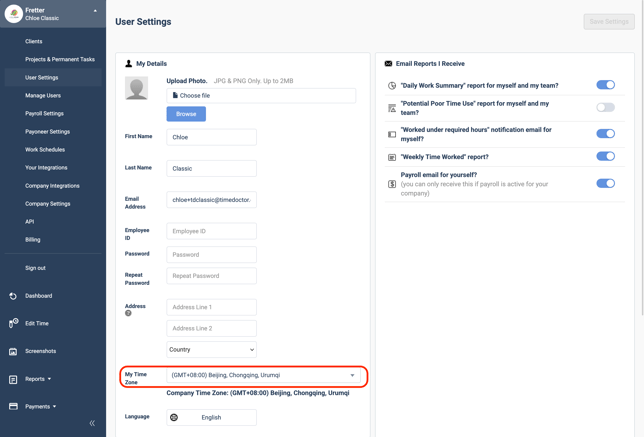
Change an Individual User’s Time Zone
-
Navigate to Settings / User Settings from the Time Doctor web dashboard.
-
Locate the user and find the Time zone setting on the left-hand side.
Change the Company’s Time Zone
Access level required: Administrator or Owner
-
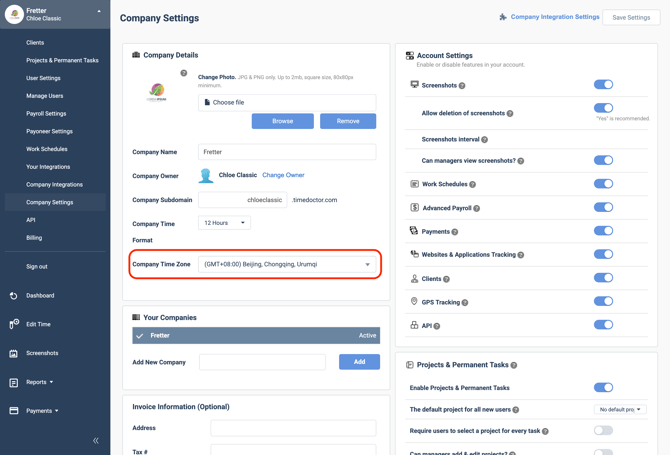
Go to Settings / Company Settings on the Time Doctor web dashboard.
-
Scroll to the bottom left-hand corner to find the Time zone setting.
Important:
-
Changing the company’s time zone may temporarily affect tracked hours across users.
-
Changes can take up to 48 hours to propagate system-wide.
Recommendation:
-
Change the company time zone before any users begin logging time.
-
If a change is necessary after time tracking has begun, apply it at the start of a weekend to minimize disruption.
Should there be any inconsistencies or concerns regarding the article, contact support@timedoctor.com for prompt assistance.